The short answer: if a password is your only protection, make it at least 15 characters long. If sign-in also needs a code or a security key, 8 characters is the minimum, but longer is still better.
- Only protection: at least 15 characters. With a second factor: at least 8.
- Websites and services: a password manager, random unique passwords of 15+ characters and a second factor wherever it's offered.
- Typed from memory: 5-6 random words, in Latin characters for a boot password.
- No scheduled changes, but change a password immediately after a leak.
What NIST recommends
NIST, the US National Institute of Standards and Technology, updated its authentication guideline SP 800-63B in 2025. It is widely used as a reference well beyond the US.
| Rule | NIST SP 800-63B |
|---|---|
| Password is the only factor | at least 15 characters |
| With a second factor (app code, hardware key) | at least 8 characters |
| Forced uppercase, digits, symbols | not recommended |
| Changes on a schedule | not required |
The rules are written for services, but suit personal passwords too: change one after signs of a leak, not every 90 days.
Why length beats complexity
The number of possible passwords is the alphabet size to the power of the length: each extra character multiplies it by the whole alphabet, while “complexity” only makes the alphabet a bit bigger. For random passwords:
| Random password | Combinations |
|---|---|
| 8 characters from the full keyboard (about 94) | about 6 quadrillion |
| 5 words from the Diceware list (7,776 words) | about 4,700 times more |
| 15 lowercase letters | about 275,000 times more |
- 8 to 15 lowercase letters: about 8 billion times more combinations
- A few random words are long and still easy to remember
- 8 lowercase letters to the full keyboard: only about 29,000 times more
- People are not random: the rules turn into
Summer2026!orP@ssw0rd, patterns a cracking tool tries first
Passphrases: long but memorable
A passphrase is a few random words, such as bucket-comet-sundae-draft-alder. It is long, yet far easier to remember than T7#qL!x9.
Dice with a word list, or your password manager's generator. Song lyrics, quotes and "ilovemydog" don't count.
4 words with a second factor, 5-6 words for a password that stands alone, such as an encryption password.
Separators and a capital letter don't hurt, but length and randomness do the real work.
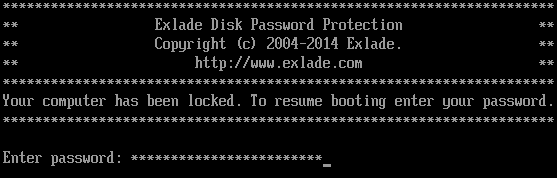
Before the operating system loads you can't switch keyboard layouts, so keep a Disk Password Protection boot password to letters, digits and common symbols of a standard US layout.
Where a password manager fits, and where it doesn’t
For websites, a password manager is the best tool: it generates random passwords of any length, remembers them and fills them in. Make its master password a long passphrase and protect it with a second factor. But some passwords are typed before any manager is running:
These need a long passphrase you know by heart. Step by step: how to set a password on computer startup.
PBKDF2: slow checks help, but don’t rescue a short password
Good encryption software derives the key from your password with PBKDF2, running it through a hash function many times with a random salt. You pay for one check when you sign in; an attacker pays for millions.
- Cryptic Disk derives its header key with PBKDF2 (PKCS #5 v2.0) using SHA-2 or SHA-3.
- Disk Password Protection 5.6 checks the boot password with PBKDF2 as well.
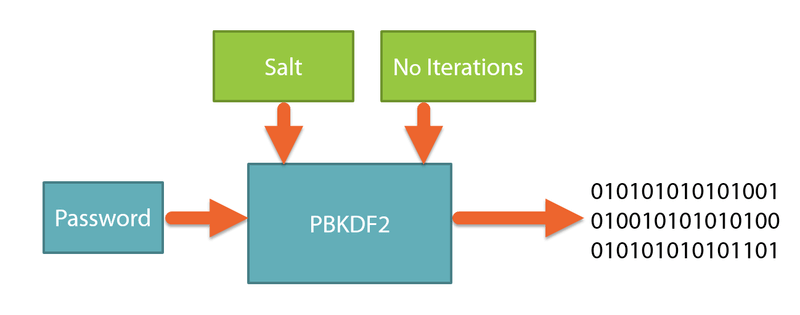
This won't save a short password. Slowdown multiplies the attack time by a fixed factor, while each extra character multiplies the combinations. A password from leaked-password lists, or a word plus a birth year, gets tried early anyway.
Key files in Cryptic Disk
Cryptic Disk can require key files in addition to the password (any file will do, up to 900 of them), or a hardware token or smart card. Then a password seen over your shoulder is not enough.
Keep key files apart from the drive, for example on a USB stick, and back them up: if a key file is lost or damaged, the drive can't be opened. The password should still be long.
Never reuse passwords
Password databases leak all the time, and attackers automatically try leaked email and password pairs on other sites: with one password everywhere, the weakest site unlocks the rest. Your encrypted drive and boot passwords should be used nowhere else.
If you forget the password
If you forget the only password to a Cryptic Disk drive, the data is lost for good: there is no back door.
It's fine to write a long passphrase on paper and keep it safe at home, just not next to the computer. To protect backups and key copies, see how to encrypt an external hard drive for backups.
FAQ
How many characters should a strong password have?
At least 15 if the password is the only protection, at least 8 with a second factor. For boot and encryption passwords, use 5-6 random words, usually more than 20 characters.
Do I need special characters in my password?
Not necessarily. Length adds far more, and an exclamation mark at the end of a predictable word adds almost nothing.
How often should I change my password?
Not on a schedule. Change it after a reported breach, or if you typed it on a suspicious site or someone else’s computer.
Is a passphrase made of common words secure?
Yes, if at least 4 to 6 words are chosen at random. Song lines, proverbs and normal sentences are weak: attackers try them from dictionaries.
Can I store my encrypted drive password in a password manager?
As a backup copy, yes, but also know it by heart: you may need it when the manager isn’t available.
No limitations during the trial. Windows 11, 10, 8.1, 8, 7, Vista and XP.
Free Trial Pricing & Buy